ARAN

Video editor for Mac and Windows

Edit videos like a pro. Subtitles in one click, in any language.

One click and the subtitles write themselves, in the language you speak. Then cut, add filters and Bokeh, animate with keyframes and export up to 8K. It all runs on your computer.

Launch price: €1.99 for the first 100 · left · then €4.99, paid once

Price
€1.99 at launch (first 100), then €4.99. Once, for life.
Mac
Apple Silicon (M1 or later)
Windows
Windows 10 and 11, 64-bit
Privacy
Your videos never leave your computer
summer-trip.aranExport

Second: blur the background.

00:00:05:15/ 00:00:12:0016:9 · 1080p · 25 fps

Features

Everything you need to edit, in one app

From the first cut to the final export. Everything comes built in, with nothing extra to install.

Subtitles in one click

Subtitles in one click

Click “Generate subtitles” and ARAN writes down everything that is said, on your computer, with a progress bar and no separate audio file. It detects the language by itself. Videos without speech don't need them, so nothing happens until you ask.

  • Edit every line in a list next to the video. Click a line and the video jumps there.
  • Style templates and position: top, middle or bottom.

And translated into other languages

A translator that runs on your computer comes built in. If you prefer another service, add your own API key. Export one video per language, or one .srt file per language.

Generating subtitles…72%

Language detected Catalan

1
00:00:00,200 --> 00:00:02,400
Tres trucs per gravar millor a casa.

2
00:00:02,600 --> 00:00:04,600
Primer: posa't la llum al davant.

Translate to

  • English
  • Español
  • Français
  • Deutsch
  • Italiano
  • Português
  • 日本語

Files

  • summer-trip_CA.mp4
  • summer-trip_EN.mp4
  • summer-trip_ES.srt
  • summer-trip_FR.srt

Multi-clip timeline

Many clips, one timeline

Import as many videos, photos and audio files as you like. Drag them into order, then split, trim and join them. Separate tracks for video, audio, text and stickers.

  • Split
  • Trim
  • Speed
  • Reverse
  • Freeze frame
  • Transitions

Keyframes

Animate anything

Add keyframes to position, scale, rotation, opacity, filters, volume and zoom. Smooth every move with easing curves.

100%140%0:02.00:03.5
  • Linear
  • Ease in
  • Ease out
  • Ease in-out

Filters and Bokeh

The look you want, in one click

Filters by category, with a live preview and an intensity slider: several black and white looks, vintage, warm, cool and cinema. You can load your own LUTs too.

Bokeh blurs the background into round lights and keeps the person sharp, with several variants. Also included: vignette, grain, blur, colour adjustments, masks, chroma key and background removal.

Try it here

80%
Original · Bokeh

Smart vertical

From horizontal to 9:16 without losing the face

ARAN reframes the video automatically and follows the face. Or make a split screen with 2 or 3 zones, or keep the whole frame with bars. Subtitles move to the right place on their own.

Follows the face
Split screen · 2
Split screen · 3
Bars

Audio

Audio effects and royalty-free music

Change how a voice sounds, add sound effects and pick music from a royalty-free library. Noise reduction, voice isolation and fades are included too.

Voice

  • Echo
  • Reverb
  • Robot
  • Phone
  • Megaphone
  • Deeper voice
  • Higher voice
  • Equaliser

Sound effects

  • Whoosh
  • Click
  • Applause
  • Laughter
Morning Drive2:41 · 112 BPMCC0 · free to use
Paper Lanterns3:05 · 96 BPMCC BY · credit the author
Low Tide1:58 · 124 BPMCC0 · free to use

ARAN saves each track's licence and warns you when you need to credit the author. Example tracks.

Keyboard shortcuts

Edit at the speed of your hands

Shortcuts in the style of CapCut and Premiere. See them all on one screen and change any of them. On Windows, Ctrl takes the place of Cmd.

  • SpacePlay / pause
  • JKLRewind · pause · forward
  • IOMark in and out
  • ⌘ BSplit at the playhead
  • ⇧ ⌫Delete a section and close the gap
  • ⌘ Z⇧ ⌘ ZUndo / redo
  • ⌘ EExport

Export

Export up to 8K

16:9, 9:16, 1:1, 4:5 and more, at the quality you choose. ARAN uses your computer's hardware encoder when it has one, so exports finish sooner.

Resolution
720p1280×7201080p1920×10802K2560×14404K3840×21608K7680×4320
Frame rate
24 · 25 · 30 · 60 fps
Codec
H.264 or HEVC, by quality or by bitrate
Hardware
Apple VideoToolbox · NVIDIA NVENC · Intel Quick Sync · AMD AMF

Drawn to scale

AI connection (MCP)

Let an AI edit with you

ARAN has a built-in MCP server. Turn it on in Preferences and an AI assistant, such as Claude, can work in ARAN: open projects, add clips, cut, make subtitles, apply filters, add text and music, and export. It runs locally, on Mac and Windows.

Claude · ARAN MCPExample

Trim the first 5 seconds, add Catalan subtitles and a warm filter, then export a 9:16 version in 1080p.

aran.open_project("summer-trip")

aran.trim(clip: 1, start: "00:00:05:00")

aran.subtitles.generate(language: "ca")

aran.filter.apply(name: "warm", intensity: 0.6)

aran.export(aspect: "9:16", resolution: "1080p", fps: 30)

Exported summer-trip_9x16_CA.mp4

Subtitles in your language

Automatic subtitles in English, Spanish, Catalan, Basque and 90+ languages

ARAN listens to what is said in your video and writes the subtitles by itself, on your computer. It recognises English, Spanish, Catalan, Basque, Galician, French and more than 90 languages, and works out on its own which one you're speaking.

The subtitles appear in a list next to the video, where you can fix any word. Then you can put them inside the video, in the style and position you like, or export them as an .srt file for YouTube or social media.

And to reach more people, ARAN's built-in translator turns them into other languages without your video leaving your computer: one video or one .srt per language.

The real app

This is ARAN

Real screenshots, nothing staged.

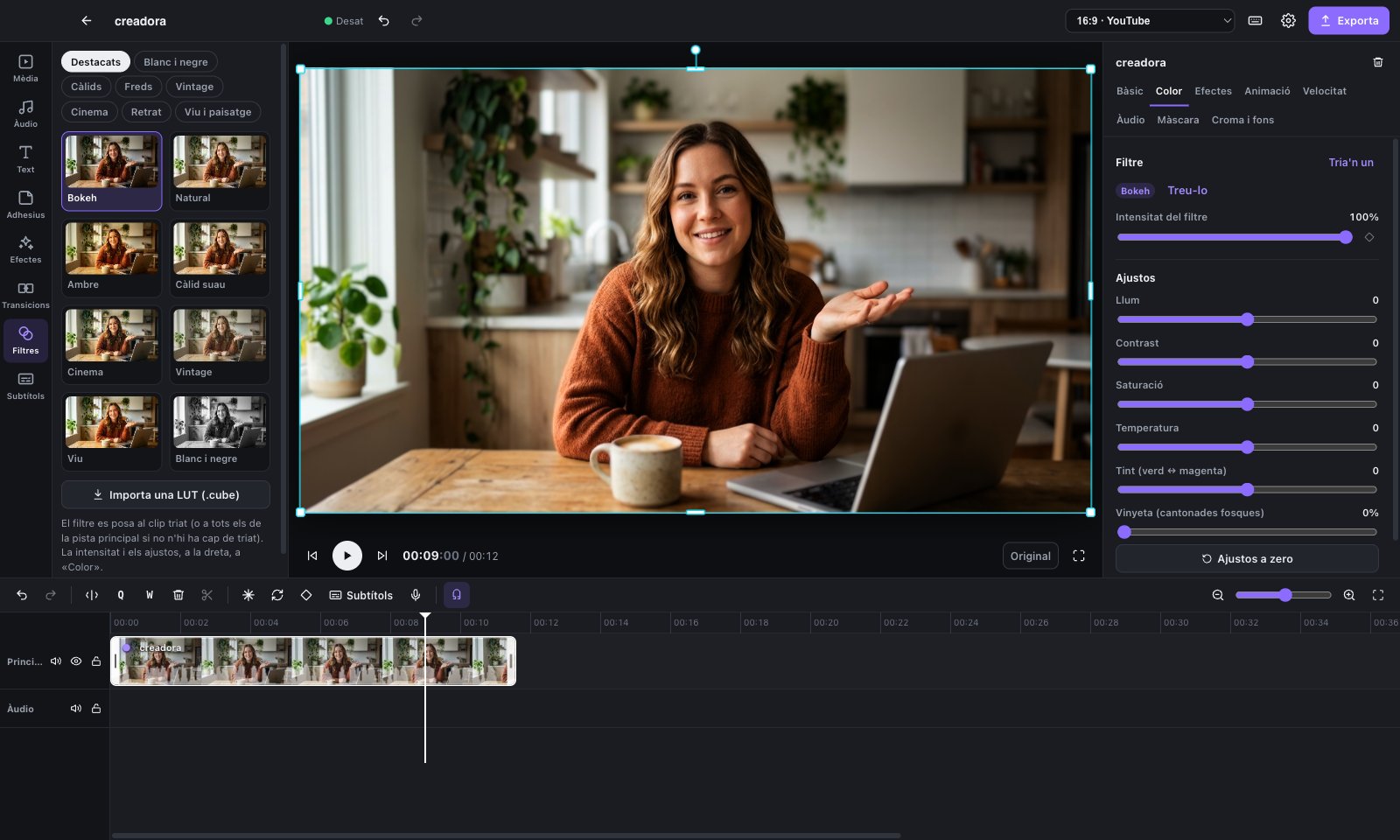
ARAN with the Bokeh filter
Filters with a live preview. “Bokeh” separates you from the background.
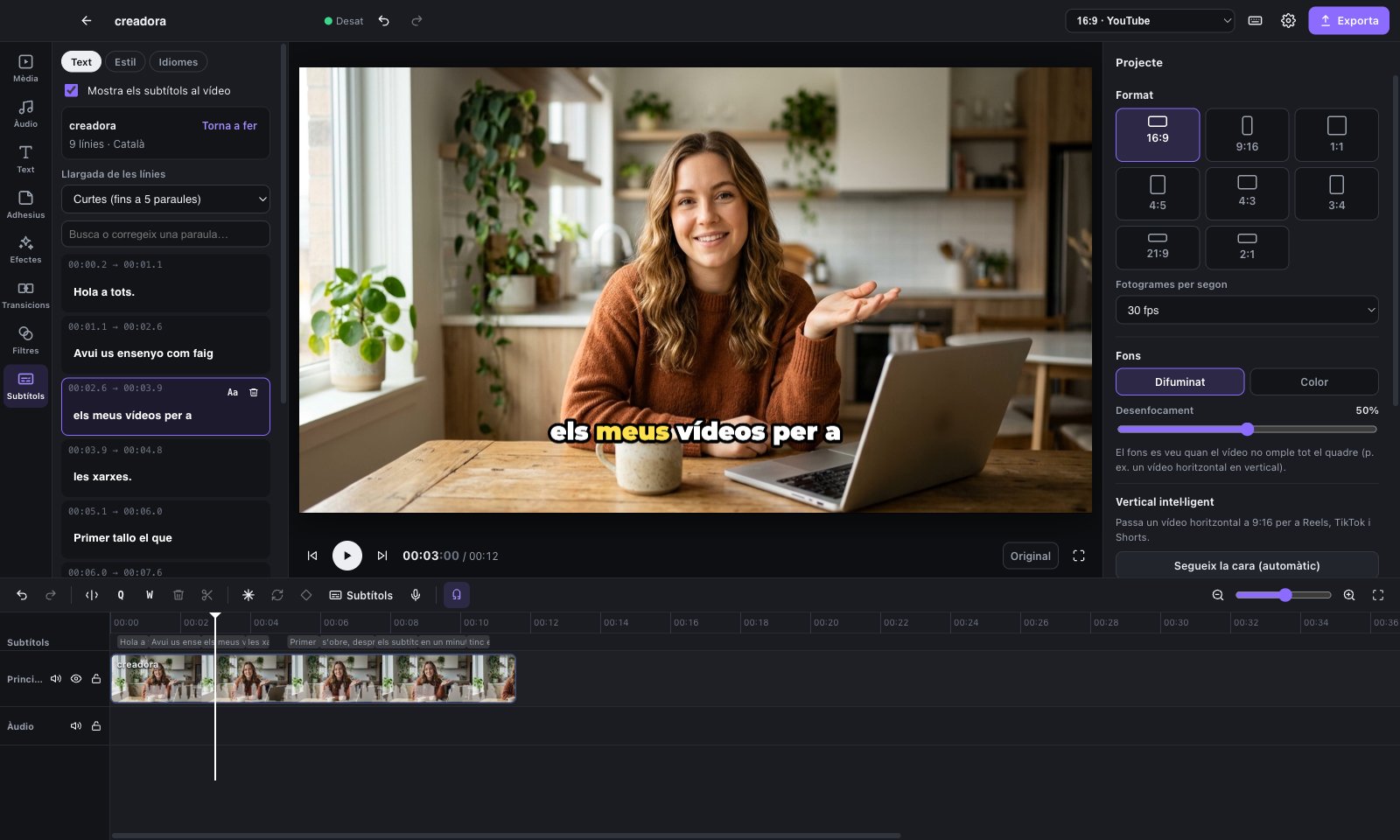
Subtitles in ARAN
Subtitles in one click, with the word being said highlighted.
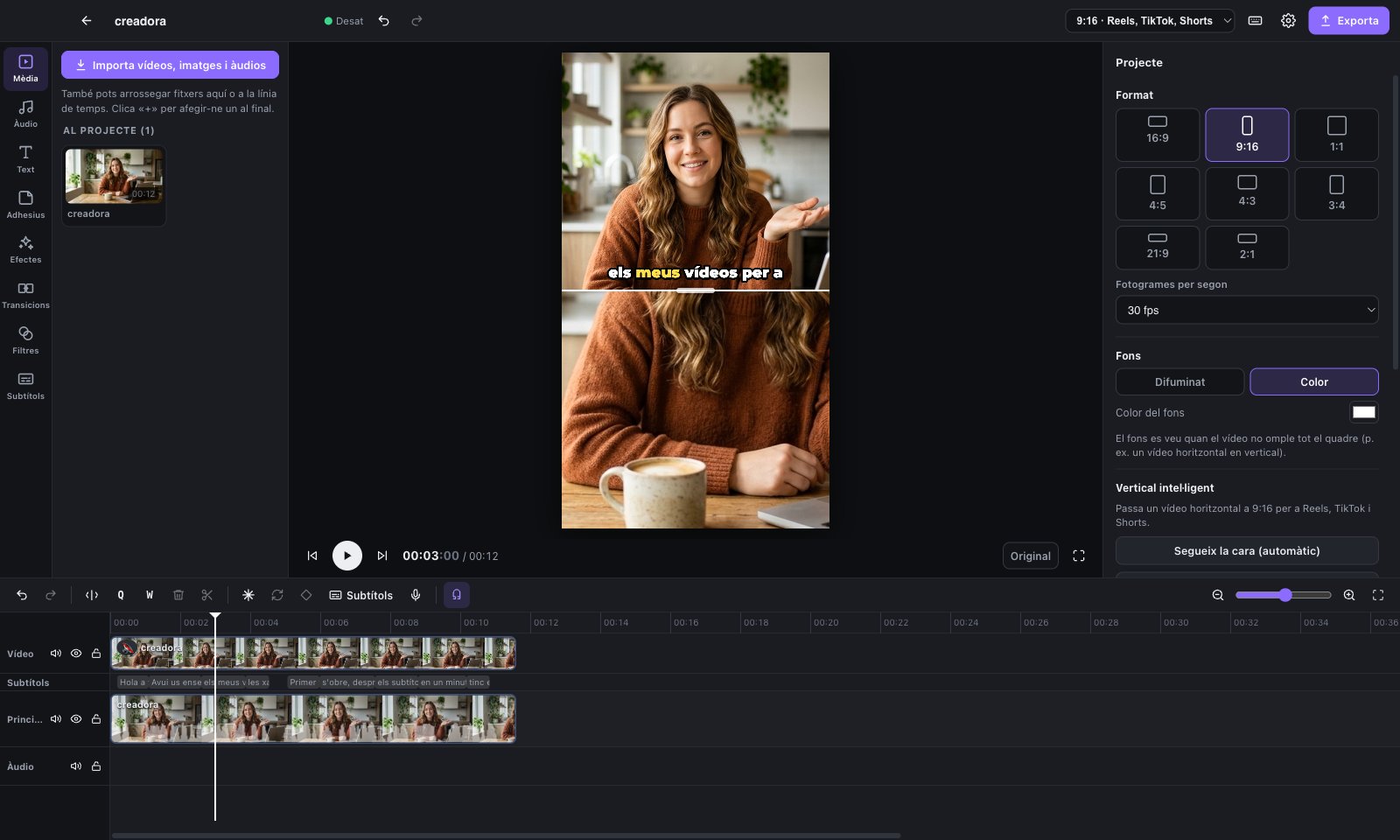
Vertical split screen in ARAN
From horizontal to vertical: split screen or follow the face.
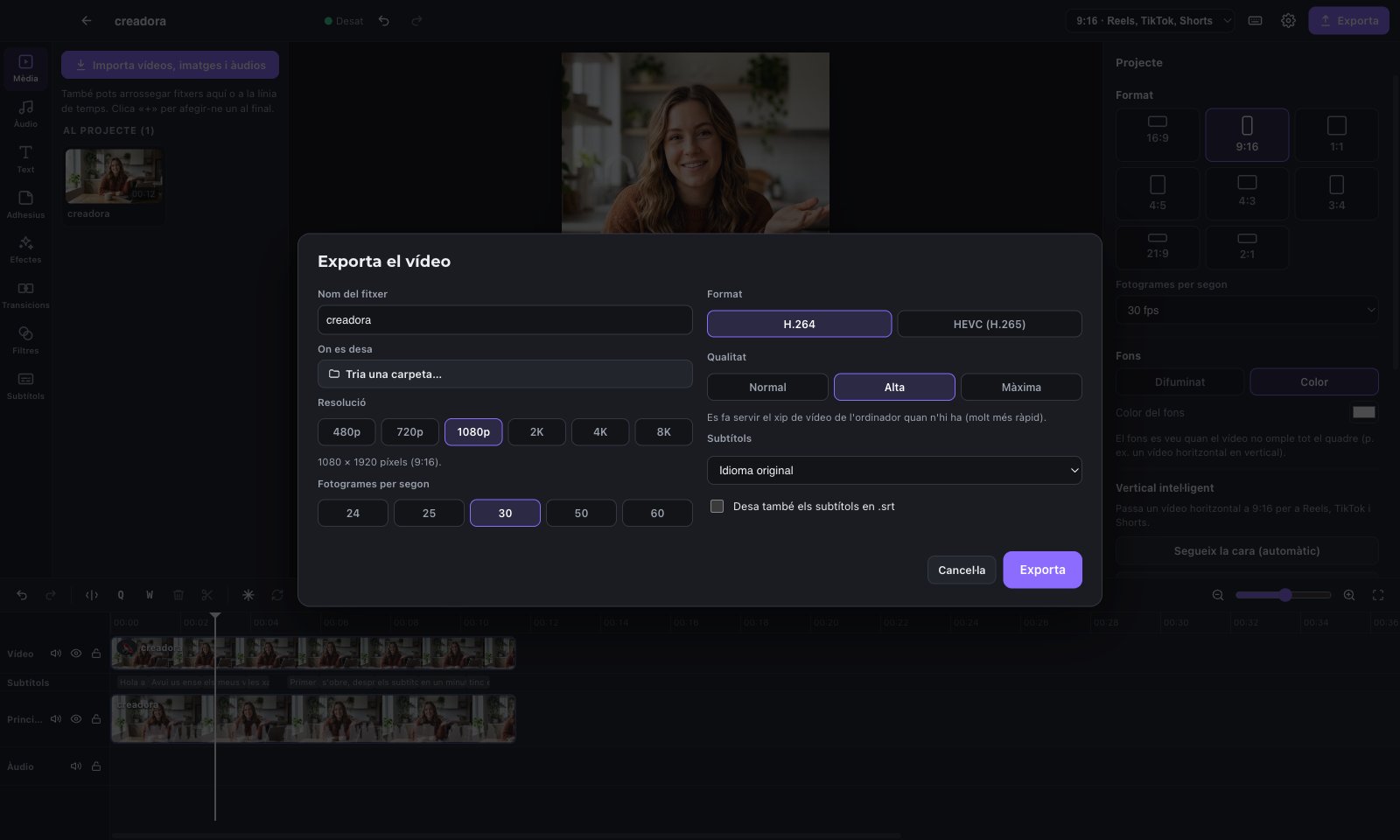
Export window in ARAN
Export from 480p to 8K, in H.264 or HEVC.

Pricing

One price. Pay once.

Launch price €1.99 for the first 100 buyers

left

of 100 sold

€1.99€4.99

Paid once, for life. No subscription. Every feature included.

  • Mac and Windows
  • Every feature on this page
  • A licence key that works offline
  • No account and no ads

Secure payment by card, Apple Pay or Google Pay.

How it works

  1. 1Buy ARAN with your email: €1.99 at launch, then €4.99.
  2. 2Download ARAN for Mac or Windows.
  3. 3Open it and enter your key once. From then on it works offline.

Download

Download ARAN

Version 1.0. Everything is included, so you don't need to install anything else. The speech model downloads the first time you make subtitles.

Mac

Apple Silicon (M1 or later) · macOS 12 or later

ARAN-1.0.0-arm64.dmg

Opening it the first time

  1. Open the .dmg file and drag ARAN into the Applications folder.
  2. Open ARAN. The Mac will say it can't verify the app. Close the message.
  3. Go to System Settings → Privacy & Security, scroll to the bottom and click Open Anyway.
  4. Confirm with your password. From then on, ARAN opens like any other app.

Windows

Windows 10 or 11 · 64-bit

ARAN-Setup-1.0.0.exe

Opening it the first time

  1. Open ARAN-Setup-1.0.0.exe.
  2. If you see “Windows protected your PC”, click More info.
  3. Click Run anyway and follow the installer.
  4. Open ARAN from the Start menu.

Why the warning? Mac and Windows show it for apps that don't have a paid developer certificate yet. ARAN will be signed in a future version, and the warning will go away.

For mobile

We're getting ARAN ready for mobile.

iPhone and iPad

Coming soon

Android

Coming soon

Minimum requirements

Mac

System
macOS 12 Monterey or later
Processor
Apple Silicon: M1 or later
Memory
8 GB (16 GB for 4K and 8K)
Disk
4 GB free
Graphics
The one built into the chip

Windows

System
Windows 10 or 11, 64-bit
Processor
Intel or AMD, 4 cores
Memory
8 GB (16 GB for 4K and 8K)
Disk
4 GB free
Graphics
DirectX 12. Faster exports with NVIDIA, Intel or AMD encoders

Internet Only to download the speech model and the translator the first time you use them, and to browse the music library.

Questions

Frequently asked questions

How much does ARAN cost?

€1.99 for the first 100 buyers (launch price), then €4.99. You pay once and keep it for life: no subscription and nothing to pay inside the app.

How does the licence work?

When you buy ARAN you get a key linked to your email. You enter it once and it keeps working without internet. It's a personal licence for your own computers.

Do updates cost extra?

No. Every update and future version of ARAN is free for everyone who has bought it, for life.

Which languages can it subtitle?

It recognises speech in more than 90 languages and works out which one you're speaking. To translate, it uses a translator that runs on your computer. If you prefer another service, you can add your own API key.

Are my videos uploaded anywhere?

No. Everything happens on your computer: subtitles, translation, filters and export. You don't need an account. ARAN only goes online to download the speech model the first time, to browse the music library and, if you choose, to translate with your own API key.

Why does my computer warn me the first time?

ARAN isn't signed with a developer certificate yet, so you need to allow it once. Follow the steps in Download.

Does it work on Intel Macs?

No. On Mac, ARAN needs Apple Silicon (M1 or later). On Windows, it works on any 64-bit PC with Windows 10 or 11.

Can I use the music in my videos?

Yes. The library only offers royalty-free music and sounds. ARAN saves the licence of each track and tells you when you need to credit the author.

Is there a free version or a trial?

No. There's no free version, no trial and no watermark: you pay once, at a small price, and you have the whole app for life.

Can an AI edit for me?

If you want, yes. Turn on the MCP server in Preferences and an assistant like Claude can open projects, cut, add subtitles and export. The connection runs locally, on your computer.

I lost my key. What can I do?

Open the link of your thank-you page again: it's your link to get the key back. If you don't have it, write to us from the email you used to buy and we'll send it again.

What if it doesn't work for me?

You have 14 days to ask for your money back, no questions asked. Just write to us.

Is there a mobile version?

Not yet. ARAN is for Mac and Windows for now. Versions for iPhone, iPad and Android are coming soon.

Coming soon

A WordPress plugin for online academies

Courses, Stripe payments, CRM and email, all on your own site and under your own brand. No fees per sale.

The Pro plan will include ARAN, with a button to publish a lesson straight to your course.

  • Courses and a student area
  • Payments and subscriptions
  • CRM and email
  • In Catalan, Spanish and English

Not available yet

Buy ARAN

Launch price · left

€1.99, paid once, for life. You'll pay on a secure page and get your key straight away, along with the downloads.

Go to checkout

Secure payment by card, Apple Pay or Google Pay.